

You uploaded a video. It did well for a day, maybe two. Then you check your dashboard and there it is: a yellow dollar sign where a green one used to be. Demonetisation almost never happens for the reason creators assume — and once you understand what's actually going on, the whole system starts to make sense.
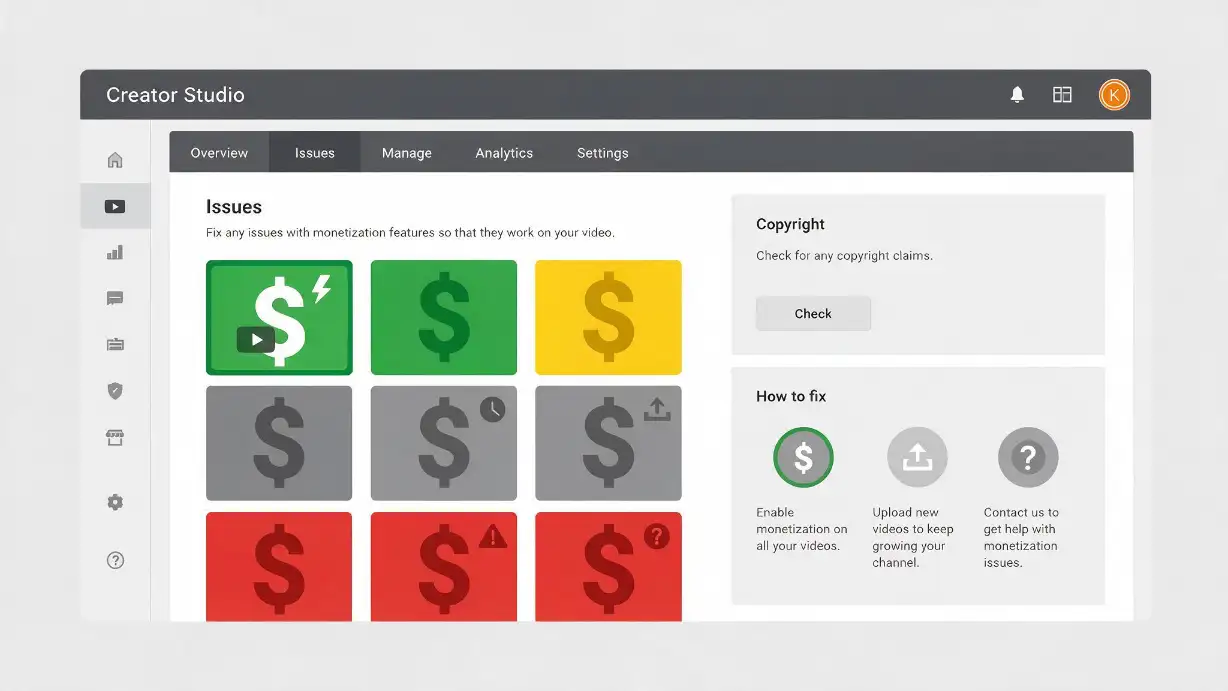
You uploaded a video. It did well for a day, maybe two. Then you check your dashboard and there it is: a yellow dollar sign where a green one used to be, and your earnings on that upload have quietly dropped off a cliff.
If you've been there, you know the feeling isn't just financial. It's confusing. Nothing in the video felt "risky" to you. No slurs, no gore, nothing you'd call inappropriate. So why did YouTube pull the ads?
The honest answer is that demonetisation almost never happens for the reason creators assume. It's rarely about being "bad" or breaking the rules in some obvious, dramatic way. It's usually a much narrower, more mechanical decision about whether your video is a comfortable place for a brand's ad to sit next to. Once you understand that distinction, the whole system starts to make a lot more sense — and so does fixing it.
Exactly why this happens, what changed with YouTube's policies in 2026, what you can actually do about it — from diagnosing which icon you're dealing with, to appealing correctly, to building habits that prevent it from coming back. No vague reassurances — practical, accurate information about how the system actually works.
What "Demonetised" Actually Means
First, a quick reality check on terminology — a lot of creators use "demonetised" to describe several very different problems, and the fix is completely different depending on which one you're actually dealing with.
Open YouTube Studio, click on any video, and look for the dollar sign icon next to it. That icon tells you everything:
Yellow is a content-suitability judgment call you can appeal through YouTube's review process. Red is a copyright dispute you resolve with the claimant or by editing out the flagged material. Confusing the two wastes a lot of time and means applying the wrong fix entirely.
Two Separate Rulebooks — And Most Creators Only Know About One
Here's the part that trips people up the most. YouTube actually runs your video against two different sets of rules, and they're not the same thing.
📋 Rulebook 1: Community Guidelines
The baseline rules for being allowed on the platform at all. Break these badly enough and you're looking at strikes, video removal, or account termination.
💰 Rulebook 2: Advertiser-Friendly Content Guidelines
This is the one that actually decides your dollar-sign colour. A video can follow the Community Guidelines perfectly — nothing removable, nothing strike-worthy — and still lose its ads, simply because the topic or language sits in territory that most advertisers have told YouTube they'd rather not sponsor.
This is why so many completely rule-abiding creators get hit with a yellow icon. You didn't do anything bannable. You just made something that a shampoo brand or a fast-food chain doesn't want its 15-second pre-roll sitting on top of. The Community Guidelines are one threshold, and the Advertiser-Friendly Content Guidelines are a separate, more conservative threshold sitting on top of them.
The Reasons Videos Actually Get Demonetised
YouTube groups advertiser-unfriendly content into roughly fourteen categories. In practice, the ones that catch out everyday creators fall into a handful of buckets — understanding these specifically is how you avoid them and appeal them correctly.
🗣️ Strong or Repeated Profanity
Occasional swearing is generally fine and won't touch your ads. What causes problems is heavy, focal use — cursing that runs through most sentences, or that shows up in your title, thumbnail, or the first several seconds of the video. That opening stretch matters more than people realise; automated systems weigh it heavily when deciding suitability.
🎮 Violence and Shocking Content
Context is everything here. A war documentary discussing real footage in a journalistic frame is treated very differently from a gore compilation where the violence is the point. Unedited gameplay violence in games rated for it is generally fine; montages built purely around gratuitous violence are not.
🔞 Sexual or Highly Sexualised Content
This covers more than explicit material — a thumbnail or title that leans heavily sexual can flag a video even if the content itself is tame. There are narrow exceptions for non-graphic sex education and certain music content, but "I was just being cheeky" doesn't move the needle if the visual language reads as sexualised.
⚠️ Harmful or Dangerous Acts
Content that could encourage viewers to imitate something risky — dangerous stunts, pranks, or challenges — gets flagged quickly, especially if it looks like something a younger viewer might try to copy.
🚬 Drugs, Alcohol, Tobacco, and Firearms
Depiction or promotion of these, even casually, tends to push a video into limited-ads territory. The guideline covers both promotional framing and casual depiction.
🌐 Controversial Issues and Sensitive Events
This is one of the more subjective categories, and it's also the one that saw the biggest shift in 2026 — YouTube's January update significantly changed what falls into "limited ads" territory here for legitimate educational and journalistic content. More on this in the 2026 Changes section.
🏷️ Hateful, Discriminatory, or Harassing Content
Content that attacks individuals or groups based on protected characteristics, or that constitutes targeted harassment, falls into clear advertiser-unfriendly territory and often triggers strikes as well as demonetisation simultaneously.
🖼️ Misleading Titles, Thumbnails, or Descriptions
This one catches a lot of people off guard because it has nothing to do with the video itself. If your thumbnail promises something the video doesn't deliver — classic clickbait — that mismatch alone can trigger a review, and it damages viewer trust on top of it. A quick way to sanity-check your own thumbnail before publishing is running it through a tool like GTR's YouTube thumbnail downloader to compare it side by side against the actual footage and make sure the two genuinely match.
©️ Copyright Claims
Different system, same headline stress. Using someone else's music, footage, or audio without a licence — even briefly — can trigger an automated claim that either redirects your revenue or removes ads entirely (the red icon). Three copyright strikes within 90 days can get a channel terminated outright.
🤖 Inauthentic or Spammy Engagement
YouTube explicitly flags get-rich-quick schemes, fake giveaways, sub-for-sub arrangements, and channels caught selling engagement metrics. It also watches your comment section — fake accounts impersonating you, or comments funnelling viewers to sketchy external links, can drag the whole channel's standing down, not just one video.
📦 Mass-Produced or Templated Content
A newer, fast-growing enforcement category. YouTube's crackdown in early 2026 specifically targeted channels pumping out repetitive, low-effort, formulaic uploads at scale. AI tools themselves aren't the problem — plenty of well-made, original videos use AI somewhere in the workflow. What gets flagged is the pattern of cheap, repetitive output, and AI simply happens to be the easiest way to produce that at volume.
🎭 Undisclosed Realistic Synthetic Content
As of 2026, if a video includes AI-generated voices, faces, or footage realistic enough that a viewer could mistake it for something genuinely real, YouTube requires you to disclose that. Enforcement tightened significantly this year — what used to draw a warning can now escalate to a temporary or permanent loss of monetisation if you keep skipping the disclosure label.
What Changed With YouTube's Rules in 2026
A few genuinely significant shifts happened this year, and it's worth knowing about them even if none of your videos have been affected yet.
✅ More Room For Creators (January 2026)
- Mental health content now fully monetisable when handled non-graphically
- Self-harm awareness content no longer automatically limited
- Suicide prevention videos restored to full ads eligibility
- Abortion education content no longer blanket-restricted
- Improved human-review process — decisions now within ~24 hours
- Better handling of edge cases for serious but legitimate topics
🚨 Stricter Enforcement in Other Areas
- AI disclosure requirements now enforced seriously — not just warned
- "Inauthentic content" crackdown on mass-produced formulaic uploads
- Skipping synthetic content labels now escalates quickly to monetisation loss
- Template-pattern channels facing targeted enforcement
- Deceptive thumbnail/title mismatches under more scrutiny
YouTube Partner Program Thresholds — What You Need to Know
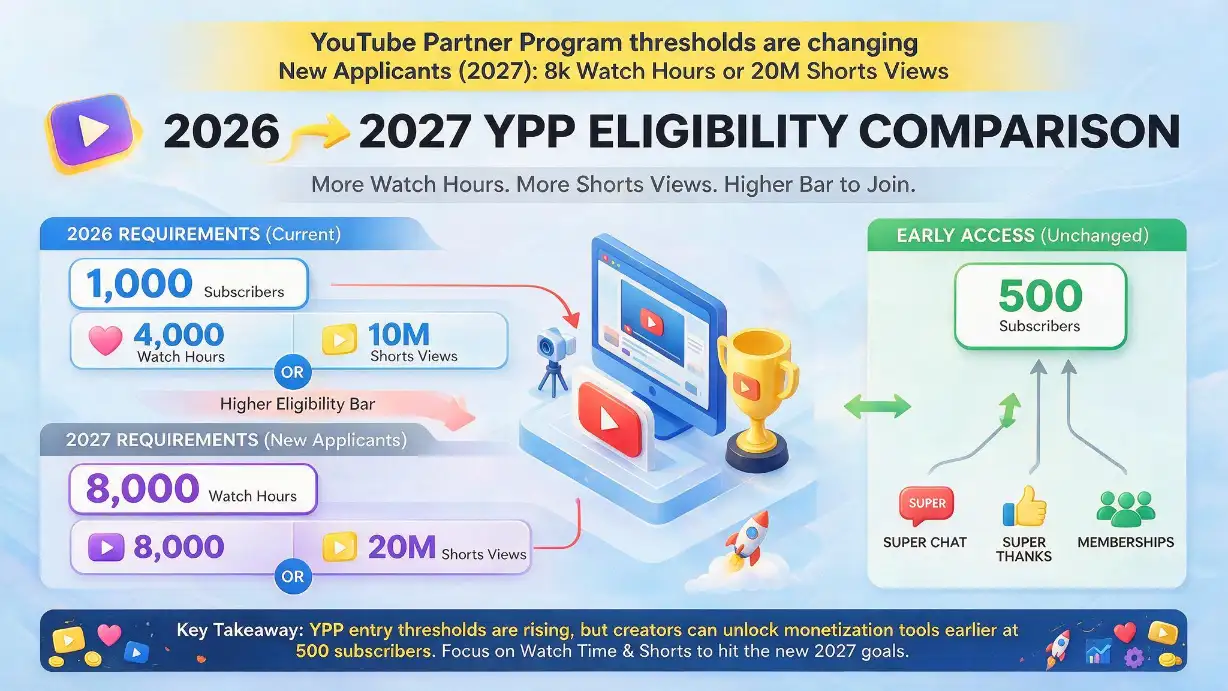
On August 10, 2026, YouTube announced it's doubling the eligibility bar for new creators joining the Partner Program from February 1, 2027. The current thresholds still apply for existing partners — this affects new applicants only.
1,000 Subscribers + Either
- 4,000 valid public watch hours (12 months)
- Or 10 million valid Shorts views (90 days)
Doubling of the Watch Threshold
- 8,000 valid public watch hours (12 months)
- Or 20 million valid Shorts views (90 days)
- Subscriber requirement unchanged at 1,000
500 Subscribers + Either
- 3,000 watch hours (12 months)
- Or 3 million Shorts views (90 days)
- Unlocks: Super Chat, Super Thanks, memberships
If Building Toward Monetisation Now
- Plan around the Feb 2027 deadline if you haven't hit current thresholds
- Existing partners are not affected by the change
- Early access tier remains open at the lower 500-subscriber bar
How to Actually Diagnose Which One Hit You
Head to YouTube Studio, click Content, and look for the affected video's dollar-sign icon. Clicking it opens a short explanation of what specifically got flagged — language, violence, a copyright match, whatever it was. That popup is more useful than most creators realise; it's the fastest way to stop guessing about what triggered the restriction.
If you genuinely believe the flag is wrong, or that context justifies the content, you can request a human review directly from that screen. Confirm that your video meets the advertiser-friendly guidelines, and if you'd like, add a short note — under 100 words works best — explaining the context. Something like "educational gameplay footage from an M-rated title" or "non-graphic discussion of a personal mental health experience" gives a reviewer something concrete to work with. Submit it, and YouTube typically responds within a few days, sometimes faster under the improved 2026 review process.
That's a copyright matter, not an advertiser-suitability one. You'll need to review the claim details, and either dispute it if you believe it's incorrect, licence the material properly, or edit the video to remove the flagged content. Don't confuse this with the advertiser-friendliness appeal process — they're entirely separate systems.
This isn't a verdict on you or your channel's quality. It's advertisers managing brand risk at scale, applied by an automated system that occasionally gets it wrong. Appeals exist precisely because the first pass isn't always right — and the January 2026 improvements to the review process were specifically designed to address the over-broad demonetisation that had frustrated creators for years.
Keeping It From Happening Again — Prevention Habits
A few habits genuinely move the needle here. These aren't vague "just be good" guidelines — they're the specific things that the automated system and human reviewers actually look at.
Whenever your subject matter could be read multiple ways, add context in your description and tags. A line explaining the educational or journalistic purpose of a video can be the difference between a flag and a pass. "Documentary exploration of historical violence" reads differently to the system than a bare title that looks like shock content.
The first several seconds of a video are where automated review weighs language and imagery most heavily. If you're swearing heavily or showing shocking content in your opener, that's what the system sees first — and what it weights most. The same content later in the video carries less risk.
Content mislabelled as "made for kids" — or genuinely aimed at kids but not marked as such — creates its own separate set of problems on top of the monetisation issues. Get your audience setting right before publishing, not after the system flags it.
If you're using AI tools anywhere in your production that produces realistic synthetic voices, faces, or footage, be upfront about it where the policy requires disclosure. It's a one-time label, and skipping it repeatedly is what escalates enforcement now — what used to be a warning in 2025 can now directly affect monetisation status.
Thumbnail-content mismatch is a genuine trigger. Before publishing, check that your thumbnail genuinely represents what's in the video. The GTR Socials YouTube thumbnail downloader lets you compare the thumbnail against actual footage — a quick sanity check that costs nothing and can prevent a review flag.
The Other Half of the Problem — The Cold Start
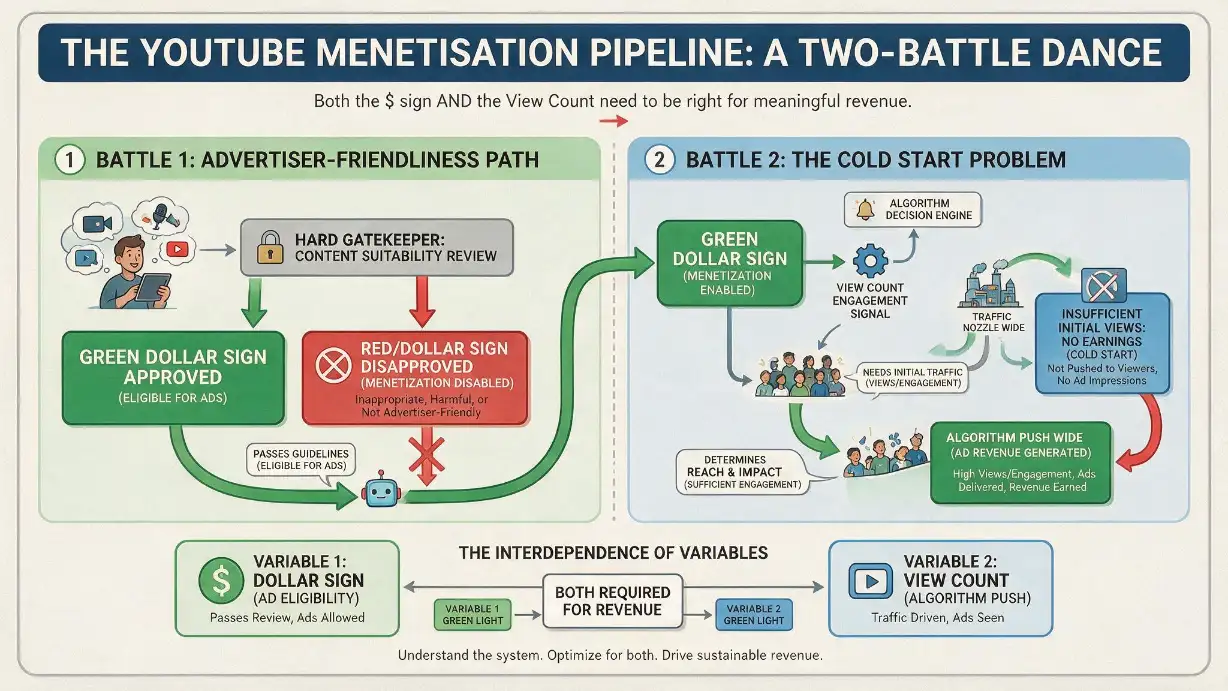
Here's something that doesn't get said enough: perfectly policy-compliant videos still lose money for a reason that has nothing to do with demonetisation at all.
If nobody sees the video in its first few hours, YouTube's algorithm doesn't get the engagement signal it needs to push it further — and a video that never gets initial traction earns close to nothing regardless of its dollar-sign colour. Creators call this the cold start problem, and it hits new and growing channels especially hard, since a brand-new upload has no watch history for the algorithm to trust yet.
Staying within the advertiser-friendly guidelines protects the ads on a video that people are actually watching. It doesn't do anything to get that video in front of people in the first place. That's a separate, earlier battle — and it's the one a lot of creators underestimate. Being fully monetised on a video nobody discovers still earns nothing. Getting initial visibility is the prerequisite that the green dollar sign depends on.
If your channel is still building that early momentum, GTR Socials' YouTube view services are built specifically for that gap: getting a new upload enough initial visibility to give the algorithm something to work with, so the content you've already made compliant actually gets a fair shot at being seen.
FAQ: YouTube Demonetisation
The Bottom Line
Demonetisation feels personal, but it almost never is. It's a narrow, mechanical judgment about advertiser comfort, layered on top of — but separate from — YouTube's actual content rules. Know which icon you're dealing with, understand which of the fourteen categories you likely tripped, and use the appeal process when the system genuinely got it wrong.
2026 brought real improvements for creators covering serious topics responsibly, alongside real crackdowns on inauthentic and mass-produced content. Stay on the right side of both, and the yellow icon becomes a rare inconvenience instead of a recurring mystery.
First: know your icon. Yellow and red are different problems with completely different fixes — don't confuse them. Second: understand the two rulebooks. Community Guidelines and Advertiser-Friendly Content Guidelines are separate, and you can pass one while failing the other. Third: appeal correctly. The human review process exists because automated systems make mistakes — a clear, specific, contextual appeal under 100 words is far more effective than an emotional or repeated one.
Your Action Plan — From Yellow Icon to Green
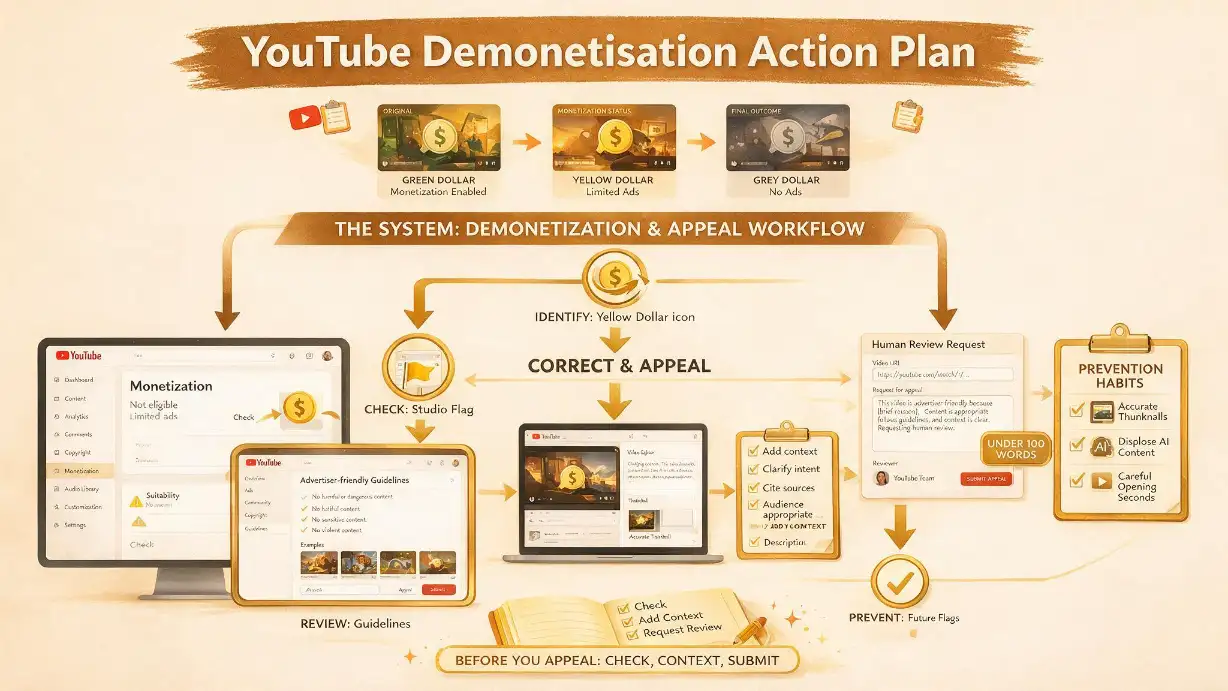
If you're dealing with a yellow icon right now: click it in YouTube Studio to find the specific flag, read the explanation, and decide whether it's accurate or an automated false positive. If you believe it's wrong, submit a human review request with a specific, contextual note — not a general complaint. Wait a few days for the response. Most yellow icons on legitimate content get reversed on appeal.
If you're dealing with a red icon: that's a copyright dispute, not a monetisation appeal. Review the claim details in Studio, determine whether you have grounds to dispute it, and either dispute it, remove the flagged content, or licence the material. Don't use the advertiser-friendliness appeal process — it's a different system.
For future uploads: add context in descriptions, watch your opening seconds, disclose any realistic synthetic content, and verify your thumbnails honestly match your content before publishing. These habits are far easier than appealing after the fact.
For the visibility problem: a green dollar sign on a video nobody sees still earns nothing. If you're building initial channel momentum, that's the second battle worth solving — and it's the one where GTR Socials' YouTube growth services are specifically designed to help.
▶️ Get Your YouTube Videos the Initial Traction They Deserve
GTR Socials helps YouTube creators solve the cold start problem — giving new uploads enough initial visibility to trigger the algorithm's expansion cycle, so your policy-compliant content actually gets seen.
Comments (0)