Instant processing
Paste a public link, preview the result, and download — no desktop software required.


Free · No signup · Browser-based
Why this tool
Paste a public YouTube URL to see title, channel, duration, and other useful metadata instantly.
Paste a public link, preview the result, and download — no desktop software required.
No app install or browser extension needed. Works on desktop and mobile.
Pair free tools with real engagement so the content you share reaches more people.
For personal use only. Respect copyright and each platform's terms of service. GTRSocials is not affiliated with third-party platforms.

Paste any YouTube URL and get the full metadata breakdown — tags, engagement, description, and more.
No account. No digging through page source. Just the data YouTube hides from plain view.
You found a video that's racking up views at an unusual rate. Or a competitor's channel is clearly doing something right and you want to understand what. Or you're trying to figure out whether a viral video is actually recent or just recirculating content from three years ago dressed up as new.
YouTube shows you what it wants you to see — the title, the thumbnail, the view count. Everything underneath that? Hidden. Upload date buried in small text. Tags invisible. Description collapsed. Engagement ratios you'd have to calculate manually. The metadata that actually tells you whether a video is performing well, whether its growth is genuine, and why it's ranking where it is — none of that is surfaced cleanly anywhere.
That's exactly what the GTR YouTube Video Info tool is built for.
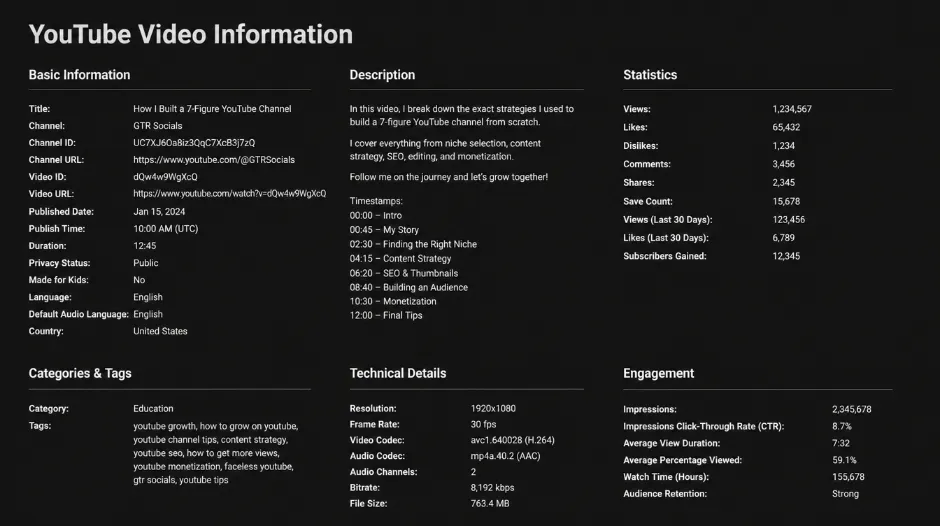
GTR Socials YouTube Video Info — full metadata for any public YouTube video
YouTube gives you surface-level information on every video. What it doesn't give you is context.
A video with 2 million views sounds impressive. But when was it uploaded? If it's five years old, 2 million is modest. If it's five days old, it's extraordinary. YouTube doesn't make that easy to see at a glance.
How many likes does it have relative to views? A 10% like rate is exceptional. A 0.1% like rate might indicate view manipulation or deeply passive viewing. You'd have to do the maths manually — and YouTube doesn't even show dislikes anymore.
What tags did the creator use? Tags drive discoverability. They tell you exactly what a creator is targeting and how they've optimised the video for search. Completely invisible to viewers by default.
These aren't minor details. For anyone serious about YouTube — creators, marketers, researchers, competitors — this information is the difference between understanding what's actually happening on the platform and guessing.
Simple. Paste any YouTube video URL into the tool and get back a complete breakdown of everything attached to that video — instantly.
Visit gtrsocials.com/tools/youtube-video-info, paste the URL, and hit Search. No login, no account, no waiting.
This is where it gets genuinely useful. Here's what the GTR YouTube Video Info tool surfaces:
Full video title, channel name, upload date, and video duration — all in one clean view without hunting through the page.
Total views, like count, and comment count. From these three numbers you can calculate engagement rate, like-to-view ratio, and comment-to-view ratio — metrics that tell you far more than raw view count alone.
The full, untruncated description including all links, timestamps, and keywords the creator embedded. YouTube collapses this aggressively — the tool shows you everything.
The complete list of tags the creator applied to the video. This is invisible to viewers in YouTube's standard interface but crucial for understanding how a video is being positioned for search and discovery.
What category YouTube has assigned the video and the language setting — useful context for understanding how the algorithm classifies and distributes it.
Direct link to the video thumbnail at full resolution — useful for creators studying thumbnail design and performance.
Your competitor just posted a video that blew up. You want to understand why. With GTR Video Info you can see exactly which tags they used, how they structured their description, when they published, and what their engagement ratio looks like. That's genuine, actionable intelligence — not guesswork.
Clients ask whether a piece of content performed well. Raw view count doesn't tell the full story. Pulling up video info gives you engagement ratios, upload context, and the full metadata picture to back up your analysis with real data rather than surface-level numbers.
Academic researchers tracking misinformation, journalists investigating viral content, analysts documenting social trends — all need reliable metadata about YouTube videos. When a video was uploaded, how fast it grew, what it was tagged as — these details matter and GTR surfaces them cleanly.
You're considering sponsoring a creator. Their pitch deck shows impressive view counts. Pull up their recent videos through GTR Video Info and check the engagement ratios, comment activity, and like rates. High views with very low engagement can indicate bought traffic. Low views with strong engagement often indicates a genuinely loyal, responsive audience.
YouTube has become a major educational resource and an equally major area of academic study. Understanding how videos are tagged, categorised, and described gives researchers better tools for analysing how educational content spreads and performs on the platform.
Pulling video info is only useful if you know what to do with it. Here's a quick framework:
Divide likes by views to get a percentage. Industry averages vary by content type — music videos typically run 3-5%, educational content often hits 4-7%, viral content sometimes exceeds 10%. Below 1% warrants investigation.
Comments represent deeper engagement than likes. A healthy ratio depends on content type — controversial or discussion-driven content will always generate more comments than passive viewing content. Look for consistency across a channel rather than single-video anomalies.
Compare the upload date to current view count. A video with 500,000 views uploaded three weeks ago is on a completely different trajectory than one with the same count uploaded four years ago. Context transforms what the numbers mean.
Look at how many tags a high-performing video uses and whether they're broad or specific. Broad tags ("music," "tutorial") compete with enormous volumes of content. Specific long-tail tags ("beginner guitar chord transitions acoustic") target smaller but more intentional searches.
No account required. No login, no personal data collected, no tracking. You paste a URL, the tool returns metadata about that public video, and that's the entire interaction. GTR doesn't store your search history or track which videos you're researching.
Works in any browser on any device — iPhone, Android, PC, Mac. No installs, no extensions.
Check the URL is complete and correct. Make sure it includes the full "youtube.com/watch?v=" portion. Shortened URLs (youtu.be links) should also work — if you get an error, try the full URL instead.
Some creators don't add tags, or YouTube may have stripped them. Empty tags on an old video are common. This is accurate data — not a tool error.
YouTube's publicly accessible view counts can lag slightly behind real-time. For very recent videos with fast-moving view counts, expect minor discrepancies.
Some creators use special characters or formatting that displays differently outside YouTube's own interface. The tool returns what YouTube's API provides.
Check your connection and refresh. The tool is lightweight — slow loading usually indicates a network issue on your end.
YouTube's interface tells you what it wants you to know. View counts, titles, thumbnails — the stuff that keeps you watching and clicking. The metadata underneath — tags, full descriptions, engagement ratios, upload context — that's what actually explains why content performs the way it does.
The GTR YouTube Video Info tool makes that information accessible in seconds. No digging through page source code. No third-party analytics subscriptions. No guesswork.
Paste a URL. Get the full picture. Make better decisions.
The data was always there. Now you can actually see it.