Instant processing
Paste a public link, preview the result, and download — no desktop software required.


Free · No signup · Multiple sizes
Why this tool
Enter a username to preview and save that account’s profile picture in multiple sizes and qualities — free and no signup required.
Paste a public link, preview the result, and download — no desktop software required.
No app install or browser extension needed. Works on desktop and mobile.
Pair free tools with real engagement so the content you share reaches more people.
For personal use only. Respect copyright and each platform's terms of service. GTRSocials is not affiliated with third-party platforms.

Download any public Twitter/X profile photo at full resolution — not the compressed thumbnail the browser shows you.
Ten seconds. No account. No app. Clean full-resolution image every time.
Someone posts a profile photo on X (Twitter) that you want to look at properly. Maybe it's a stunning piece of art they're using as their avatar. Maybe it's a photo of someone you're trying to identify professionally. Maybe it's your own old profile picture that you never saved anywhere else and now you want it back.
You click on it. Twitter shows you a slightly larger version inside a lightbox. You right-click and try to save it. What lands on your device is a tiny, compressed thumbnail — nothing like the full-resolution image the person uploaded.
Twitter doesn't make this easy on purpose. The GTR Twitter Profile Photo Downloader does.
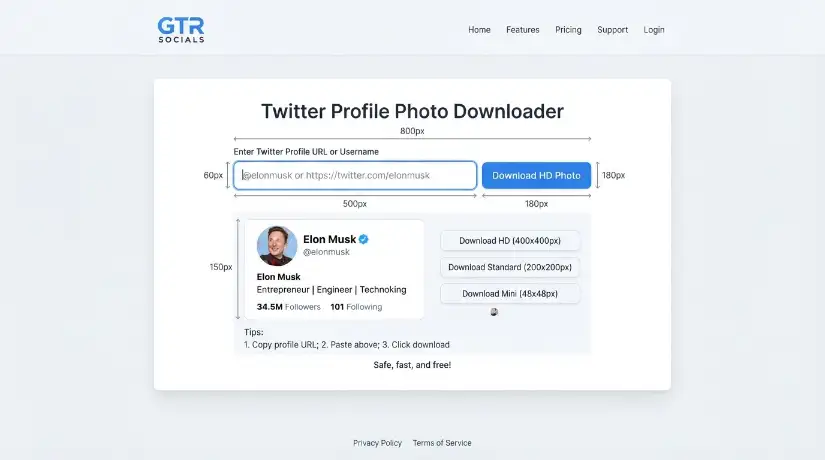
GTR Socials Twitter Profile Photo Downloader — the full image was always there, now you can actually have it
Every image Twitter displays is served through their CDN at whatever resolution their interface decides is appropriate for that context. Profile photos in the timeline are small. Profile photos in the lightbox are medium. The full-resolution original the user uploaded is sitting on Twitter's servers — you're just never shown a direct link to it.
Right-clicking and saving gives you whatever compressed version the browser rendered, not the source file. For professional headshots, artwork, and anything where quality actually matters, that's a meaningful difference.
The GTR Twitter Profile Photo Downloader bypasses the CDN compression and retrieves the full-resolution original directly.
Go to the profile whose photo you want. Copy the URL from your browser's address bar — it'll look like twitter.com/username or x.com/username. On mobile, tap the profile, tap Share, and copy the link.
Visit gtrsocials.com/tools/twitter-profile-photo-downloader, paste the profile URL, and hit Download.
Your profile photo downloads instantly at full resolution — the actual image the user uploaded, not the compressed thumbnail Twitter serves in the browser.
Not the thumbnail Twitter shows in the lightbox. The actual source image at its original dimensions and quality.
Paste a URL and download. No email, no account, no personal information.
Clean image file. Nothing added.
No logging, no tracking, no data collection.
iPhone, Android, PC, Mac. Same process in any browser.
Free and unlimited, always.
Copy the Twitter profile URL (from the browser or Share → Copy Link in the app). Open Safari and go to gtrsocials.com/tools/twitter-profile-photo-downloader. Paste the URL and tap Download. Tap and hold the image when it appears, then select Save to Photos. Full-resolution image lands directly in your Camera Roll.
Copy the profile URL from Twitter or X. Open Chrome and visit gtrsocials.com/tools/twitter-profile-photo-downloader. Paste the URL and tap Download. Tap and hold the image and select Download Image. Find it in your Gallery or Downloads folder immediately.
Go to twitter.com or x.com and navigate to the profile. Copy the URL from your browser's address bar. Open a new tab: gtrsocials.com/tools/twitter-profile-photo-downloader. Paste the URL and click Download. Right-click the full-resolution image and save it to your preferred folder.
A significant number of Twitter users commission custom artwork for their profile photos — illustrations, digital paintings, character art. If you're the artist who made it and you need the file, or if you want to properly credit and reference the work, having the full-resolution image matters. Thumbnails don't cut it for either purpose.
Journalists, recruiters, and researchers routinely need to verify identities and cross-reference profile photos across platforms. A compressed 48x48 pixel thumbnail is useless for this. The full-resolution source image is what actually allows meaningful comparison and verification work.
You uploaded a profile photo years ago and never saved it anywhere else. Your original file is gone. Twitter has it — at full resolution — but the interface won't give it back to you cleanly. GTR retrieves it directly.
Designers, photographers, and artists often collect profile photo references — lighting approaches, composition styles, colour grading choices. Full-resolution images are worth studying. Compressed thumbnails are not.
Companies maintaining internal directories or team pages sometimes need profile photos from public Twitter accounts — for speakers, partners, collaborators. GTR provides clean, full-resolution images without anyone needing to manually request files from every individual.