Channel profile
See the public name, handle, avatar, and description for any channel.


Free · No signup · Channel insights
Why this tool
Instantly see channel name, avatar, subscriber count, total videos, views, join date, and linked social profiles — free and without signing in.
See the public name, handle, avatar, and description for any channel.
Check subscribers, video count, and total views in one place.
View join date, country, and linked social or store pages when available.
For informational use only. GTRSocials is not affiliated with YouTube or Google.

Enter any YouTube channel URL or handle and get a complete, clean view of the channel — full video library, upload history, engagement data, and channel metadata all in one organised place.
No login. No account. No Chrome extension. Just a complete picture of any public YouTube channel, instantly.
You've come across a YouTube channel that looks interesting. Maybe someone recommended it, maybe a single video showed up in your feed and the content was good enough to make you want to see what else they've made. You click through to the channel page.
And then you spend five minutes trying to figure out anything meaningful about it.
YouTube's channel pages show you what they want you to engage with — featured videos, latest uploads, whatever the algorithm is currently promoting. What they don't show you cleanly is the stuff that actually helps you evaluate a channel: full upload history in chronological order, total video count, consistent engagement patterns, how the content has evolved, whether growth is real or a single viral spike from three years ago.
The GTR YouTube Channel Viewer gives you all of that in one place.
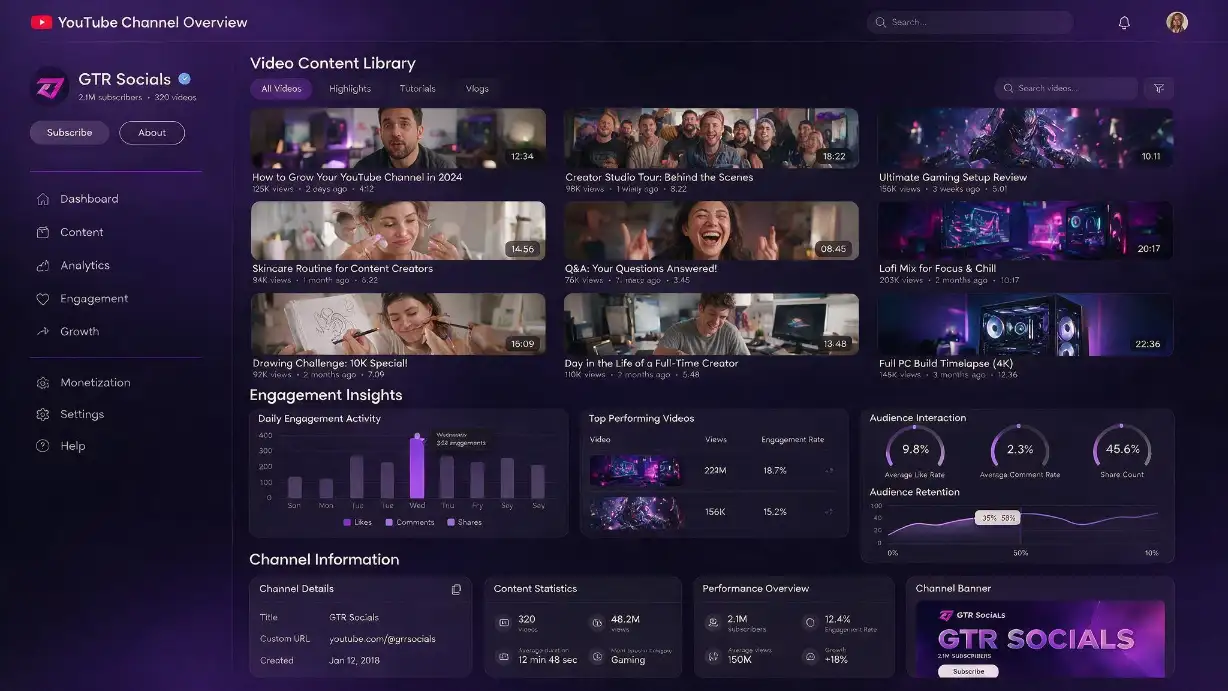
GTR Socials YouTube Channel Viewer — see the whole channel, not just what YouTube surfaces
YouTube channel pages are designed to convert visitors into subscribers and keep them watching — not to give you an objective picture of what a channel is and how it performs.
The videos you see on a channel homepage aren't necessarily the best or most representative content. They're whichever videos YouTube's algorithm decided to surface based on your viewing history, what's currently trending, and what the channel owner has pinned or featured. Two people visiting the same channel can see completely different content arranged in completely different orders.
That's fine for casual browsing. It's useless for actually understanding a channel.
Want to see a channel's oldest videos? You can sort by date — eventually — after clicking through enough menus. Want to understand how the content quality or style has evolved over time? You're doing that manually, video by video.
Visit gtrsocials.com/tools/youtube-channel-viewer, enter any YouTube channel URL or handle, and get a complete, clean view of the channel — full video library, upload history, engagement data, and channel metadata all in one organised place.
No login. No account. No Chrome extension. Just a complete picture of any public YouTube channel, instantly.
Every public video the channel has ever uploaded, displayed cleanly and sortable by date, view count, or engagement. Not what the algorithm decided to show you — everything.
Total subscriber count, total video count, channel creation date, country of origin, and channel description. The full context that YouTube scatters across multiple pages and menus.
How often does this channel actually post? Consistent weekly uploads or sporadic bursts with long gaps? Upload patterns tell you a lot about a channel's professionalism and sustainability.
View counts, like counts, and comment counts across the video library. Spot engagement patterns, identify which content performs and which doesn't, and get a real read on audience responsiveness rather than raw subscriber numbers.
When was the channel created? When did growth accelerate? Was there a single viral moment or sustained consistent growth? Context that raw subscriber counts never provide on their own.
A creator pitches you a sponsorship. Their media kit shows impressive subscriber numbers. Before committing a budget, you want to know whether that audience is real and engaged. GTR Channel Viewer lets you check upload consistency, engagement ratios across multiple recent videos, and whether view counts are stable or declining. Subscriber count is a vanity metric — engagement patterns across a full video library tell the actual story.
Understanding what's working in your niche requires looking at more than one video from each competitor. GTR Channel Viewer lets you browse a competitor's complete upload history, spot which topics consistently outperform, identify content gaps they haven't covered, and understand their posting cadence. That's genuine strategic intelligence, not a surface-level impression from whatever their algorithm served you on a channel visit.
Before approaching another creator for a collaboration, you want to understand their channel properly. Are their engagement rates healthy? Is their content consistent with what they're pitching you on? Has their channel been growing or declining over the past six months? These aren't questions you can answer from a channel homepage visit.
YouTube channels are increasingly significant primary sources — for political analysis, cultural research, misinformation tracking, and documentation of events. Accessing a channel's complete upload history in chronological order, with metadata attached, is a research requirement that YouTube's standard interface handles poorly.
Evaluating whether a YouTube channel is a reliable educational source requires looking beyond the most recent videos. GTR Channel Viewer lets educators assess consistency, engagement quality, and content evolution across a channel's full history before recommending it as a resource.
Pulling channel data is useful only if you know what to look for. Here's a quick framework:
Divide average video views by subscriber count. Healthy engaged channels typically see 5-15% of subscribers watching each video. Significantly below that suggests subscriber atrophy — people subscribed, stopped watching, and never unsubscribed. High ratios sometimes indicate a channel punching above its subscriber weight through strong SEO.
Look across 15-20 recent videos rather than cherry-picking the best performers. A channel with consistent engagement across its library has a healthier audience relationship than one with occasional spikes and otherwise flat numbers.
Long gaps in upload history usually indicate something happened — burnout, platform issues, pivots in content direction, or external circumstances. A channel that went six months without uploading and came back to significantly lower view counts is at a different point in its trajectory than one that maintained consistent output.
Comments represent genuine active engagement — someone cared enough to type something. A channel with healthy comment activity relative to views has an audience that's genuinely invested, which matters for sponsorships, collaborations, and assessing real influence.
No account required. No personal data collected. No login of any kind. You enter a channel URL, get the data, and that's the complete interaction. GTR doesn't log which channels you're researching or build any profile on your usage.
Works on any device in any browser — iPhone, Android, PC, Mac. Nothing to install or set up.
Make sure you're using the full channel URL or the correct handle format (@channelname). Older channels sometimes have URLs in different formats — try both the handle and the direct channel URL.
Private or unlisted videos don't appear in public channel data. The tool returns only publicly accessible content — which is the same content available to any viewer.
Very new uploads sometimes have incomplete engagement data while YouTube's systems update. Check back after a few hours for accurate counts on recent videos.
Channels with thousands of videos take slightly longer to load than small channels. This is expected — the tool is pulling a complete library rather than a curated selection.
YouTube channel pages are sales pages. They're designed to get you subscribing and watching, not to give you a clear-eyed view of what a channel actually is and how it performs.
The GTR YouTube Channel Viewer gives you the complete picture — full video library, engagement patterns, upload history, channel metadata — without the algorithmic curation and without the friction of clicking through multiple menus and pages to piece it together yourself.
Whether you're evaluating a sponsorship opportunity, researching a competitor, vetting a collaboration partner, or simply deciding whether a channel is worth your time — you now have a way to make that call with actual data.
One URL. The whole picture.