

Emma woke up to her profile changed, her bio replaced with a scam link, and hundreds of her followers already engaged with fake crypto posts. She spent 48 hours thinking the account was gone permanently. Within 24 hours of using the right recovery method, it was secured and restored.
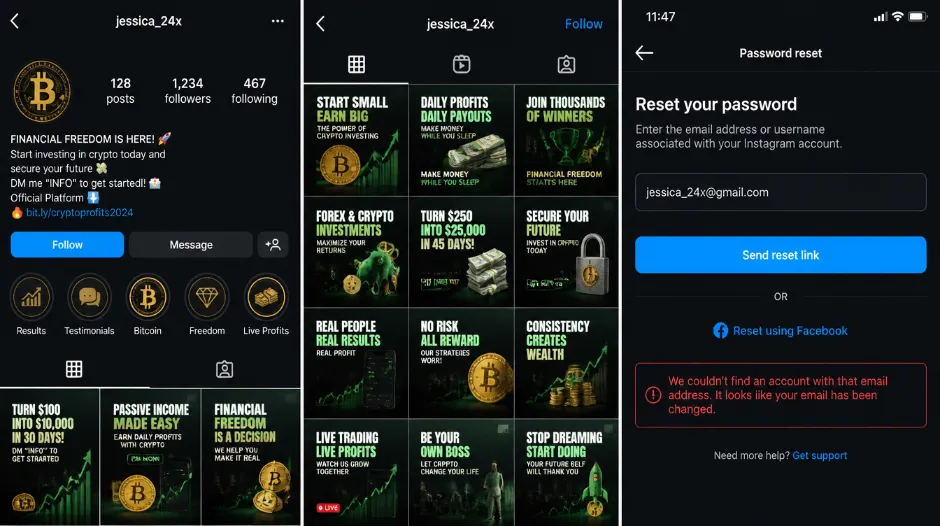
Two weeks ago, I watched my colleague Emma discover her Instagram account had been completely hacked.
She woke up to notifications she'd never sent. Her profile picture was changed. Her bio was replaced with a link to some sketchy website. Her most recent posts were ads for cryptocurrency and fake investment schemes. Worst part? Hundreds of her followers had already engaged with the hacked posts, and her DMs were flooded with confused messages from people asking if she was promoting scams.
"Someone has my account and they're using it to scam people," she told me, genuinely panicked. She immediately tried to change her password — but couldn't log in. The hacker had changed it. She tried "Forgot Password" but they'd also changed her email address in the account settings. She tried reaching out to Instagram support but got an automated response saying they'd get back to her within "a few days."
Emma spent 48 hours thinking her account was permanently gone. Then she found the actual recovery process — the one Instagram doesn't advertise. Within 24 hours of using the right method, her account was secured and restored.
Instagram hacking is scary but recoverable if you act fast with the right steps. Most people don't know the fastest recovery methods, which is why accounts stay compromised for days or are given up on entirely. If you know what to do right now, you can regain access within hours, not days. The first hour is critical — and this guide starts with exactly what to do in it.
What Hacking Actually Looks Like
Before recovering, understand what's actually happened — and confirm it's genuinely a hack rather than a temporary login issue.
🚨 Obvious Signs (Act Immediately)
- Can't log in — password doesn't work
- Profile picture changed without your action
- Bio updated with sketchy links or content
- Posts you didn't create — usually promoting scams
- Email or phone number changed in account settings
- Password reset emails you didn't request
- Followers messaging that account looks suspicious
- Posts tagged or shared by your account you didn't make
⚠️ Less Obvious Signs (Investigate Immediately)
- Unusual "login from new location" notifications
- Follow requests sent you don't remember making
- DMs sent that you don't remember sending
- Followers increased dramatically overnight
- Engagement on posts you didn't post
- Profile visits from random unfamiliar locations
How Hacking Happens — The Real Methods
🔑 Weak or Reused Password
The most common cause. Hackers use passwords from other data breaches and try them on Instagram. If you've used the same password elsewhere, or haven't changed it in years, they may already have it from a previous breach at another service.
🎣 Phishing Links
You clicked a link in a DM or email that looked like Instagram's login page, entered your credentials thinking it was real, and the hacker captured them. These fake pages can be virtually indistinguishable from the real thing.
💻 Malware on Your Device
You downloaded an infected file or have a keylogger capturing your passwords as you type them. The hacker sees every login you enter on your device, including Instagram.
🗣️ Social Engineering
Hacker contacts Instagram support impersonating you, convinces support you've lost access, and support "helps" by resetting the account to the hacker's email. This grants complete control without ever needing your password.
📧 Account Takeover Through Email
Hacker first compromises your email account, then uses it to reset your Instagram password through "Forgot Password." Once they have your email, they effectively control everything linked to it.
Most hacking is opportunistic. Hackers have passwords from data breaches, try them on Instagram, and get in. You're typically not specifically targeted — you're someone whose password they happen to already have from a different service. This is why password reuse is so dangerous and why unique passwords for every account are non-negotiable.
Immediate Actions — The First Hour
If your account just got hacked, act immediately. Every minute the hacker has access, more damage accumulates.
Don't change multiple passwords from the hacked device — it might have malware recording everything you type. Don't log in from public WiFi. Don't engage with the hacked posts. Do take screenshots of the hacked activity if possible — you'll need them for reports.
Stay Calm and Assess What's Still Accessible
Most hacks are recoverable. Your first job is to assess what the hacker has already changed — password, email, phone number — before choosing the right recovery path.
Try Password Reset (If You Can Still Log In)
If you can still access your account: go to Settings → Security → Change Password. Use a strong new password (16+ characters, mix of letters/numbers/symbols). Don't use any password you've used before. If you can still log in but suspect a breach — change the password right now, don't wait.
If You Can't Log In — Start Password Recovery
Go to instagram.com (not the app). Click "Can't log in?" below the login button. Enter your username or email. Choose your reset method: email link, SMS code, or Facebook (whichever you can still access). If you receive the recovery code, enter it immediately and create a strong new password.
Secure Your Email and Phone First
If you can't reset the password because the hacker changed your email or phone, secure those first. Go to your email provider and change the password. Check Connected Apps for anything unrecognised. Enable two-factor authentication on your email. Contact your phone carrier if you suspect a SIM swap. Your email is the master key — securing it is step one.
Report Account as Hacked to Instagram
Use Instagram's dedicated hacked account form: go to instagram.com/hacked directly, or via instagram.com → Help → Report Something. Report the account as hacked. Instagram prioritises hacked account reports and usually responds faster than general support.
The Fastest Recovery Methods
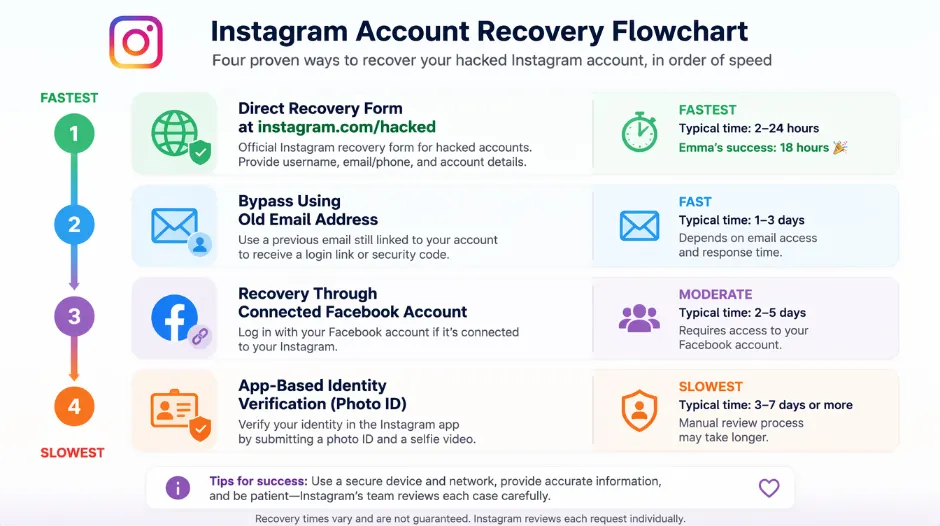
The Direct Recovery Form (Fastest)
instagram.com/hacked — Emma's winning approachIf the standard password reset doesn't work, use Instagram's account recovery form specifically for hacked accounts. Go to instagram.com/help/contact on desktop. Select "Report Something" then "I think my account has been hacked or compromised." Fill out the form as thoroughly as possible, including your username, the email(s) associated with the account, your phone number, when you noticed the hacking, what the hacker did, and any screenshots of unauthorised activity.
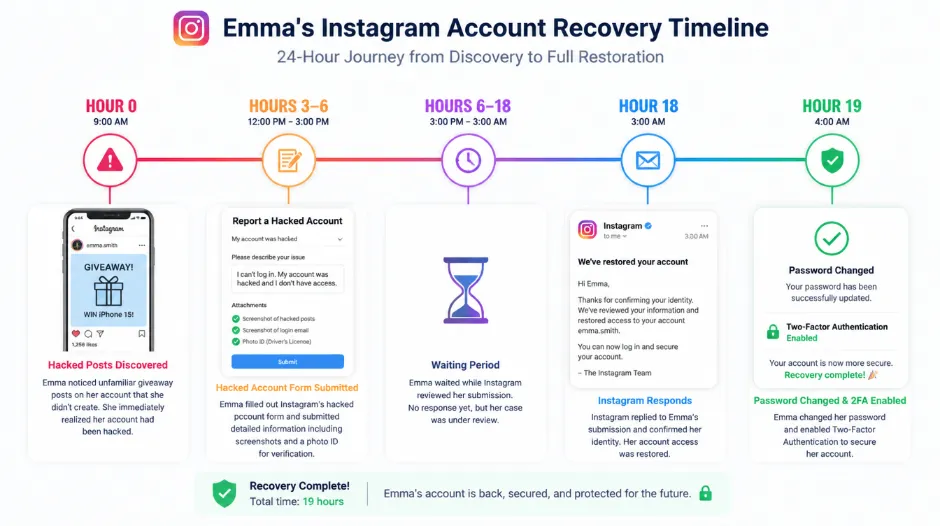
Emma's approach: used this form, included screenshots of all hacked posts, included a photo of her government ID. Account restored in 18 hours.
Bypass Hacker's Email Change
Use your old email address before the hacker changed itIf the hacker changed your email address but you remember the old one, try this: go to the login page, click "Can't log in?", enter your OLD email address (the one before the hacker changed it), select "Send Link to Email", and check that original email account for the recovery link. This can bypass the hacker's change entirely.
Regain Through Connected Facebook Account
If Instagram was linked to your Facebook accountIf your Instagram is linked to Facebook: go to facebook.com and log into your Facebook account. Go to Settings → Apps and Websites and find the Instagram connection. Click Remove. Then go back to Instagram login and click "Login with Facebook." This creates a new Instagram session that bypasses the hacker's password entirely.
Contact Instagram via App
Last resort if website methods all failTry to log in via the Instagram app (it will fail). On the error screen, look for "Need Help?" and report the account as compromised. Follow prompts to verify your identity. Instagram may ask for: a photo of yourself holding your ID, a selfie matching your profile picture, answers to security questions, or email verification via a new process.
What to Do After You Regain Access
Regaining access is step one. Securing and restoring the account is the critical work that determines whether you get hacked again immediately.
Change your password immediately — 16+ characters, mix of letters, numbers, symbols, completely different from any previous password and any password you use elsewhere.
Check connected apps and accounts — go to Settings → Apps and Websites. Remove any apps or accounts you don't recognise. Disconnect services the hacker might have added during their access window.
Enable two-factor authentication immediately — Settings → Security → Two-Factor Authentication. Use an authenticator app rather than SMS if possible (SMS can be intercepted via SIM swap attacks). Save backup codes somewhere secure.
Review all account settings — verify your email address is yours, confirm your phone number is yours, check recovery email is set to your own address. Update everything the hacker may have changed.
Review account history — delete any posts the hacker created, remove any stories they posted, remove followers added by bots, and block any accounts associated with the hacker's activity.
Notify your followers — post a genuine update: "My account was recently hacked. I've recovered it and secured all access. Please disregard any suspicious posts from the past [timeframe]." Address any scams the hacker promoted. Your credibility depends on getting ahead of this.
Check your messages — review DMs the hacker sent, clarify with anyone they messaged, and assess whether anyone sent sensitive information in response to the hacker's impersonation.
Update all passwords — change passwords on every other account that used the same or similar password. Check haveibeenpwned.com with your email to see if you're in known data breaches, and change any passwords exposed.
Review device security — run antivirus scan on your computer and phone, update all software and apps, check browser extensions and remove suspicious ones, review browser-saved passwords and remove any that are compromised.
Monitor your account — check login activity at Settings → Security → Logins, set alerts for unusual activity, review your followers list for suspicious accounts, and stay vigilant for further compromise attempts.
Common Recovery Mistakes That Make Things Worse
These six mistakes are responsible for most of the cases where accounts stay compromised or get re-hacked immediately after recovery.
Trying to recover Instagram without first securing the email account. The hacker keeps accessing through email even after you change the Instagram password.
Using the same device or network that was compromised to run the recovery. If there's malware, the hacker sees everything you type during recovery, including your new password.
Regaining access but celebrating and forgetting to change the password. The hacker can still log back in with the old password until you change it.
Not investigating how they got in means they can get in the same way again — even with a new strong password, if a phishing link is still in your DMs or malware is still on your device.
The hacker may have added malicious apps that still have access to your account even after you change the password. Account can be compromised again through these apps immediately.
Trying one recovery method, having it not work, and assuming the account is permanently lost. Most hacked accounts are recoverable — but only if you try multiple methods.
Prevention — Stop Future Hacking Before It Starts
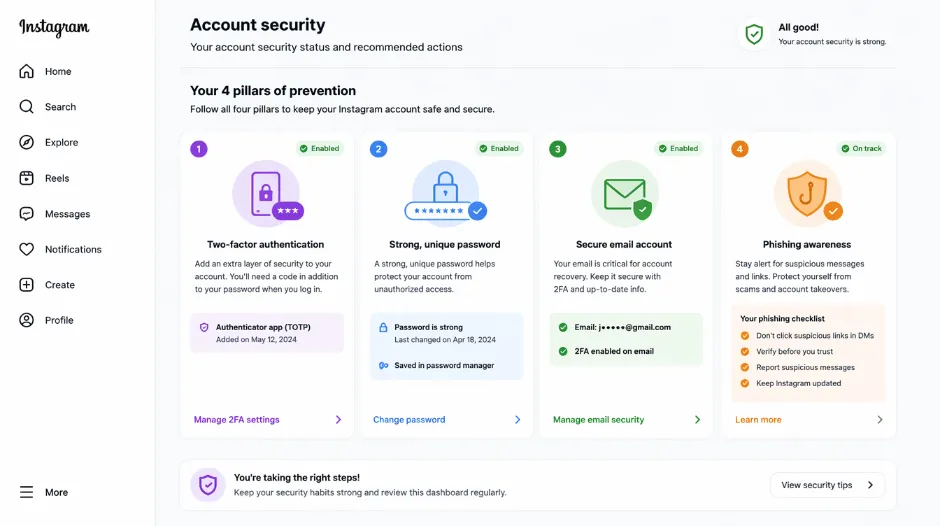
Prevention is 100x easier than recovery. Here's exactly what keeps Instagram accounts secure.
🔑 Strong Password Strategy
- 16+ characters (longer is better)
- Mix of uppercase, lowercase, numbers, symbols
- Completely random — not based on words or birthdates
- Unique per account — never reuse any password
- Stored in a password manager, not written down
- Use Bitwarden, 1Password, or LastPass — all excellent
🔐 Two-Factor Authentication
- Non-negotiable — always enable 2FA on Instagram
- Settings → Security → Two-Factor Authentication
- Use an authenticator app, not SMS where possible
- Google Authenticator, Authy, Microsoft Authenticator all work
- SMS can be intercepted — authenticator app is more secure
- Save backup codes in a password manager or safe location
🎣 Avoid Phishing Links
- Be skeptical of links in DMs from accounts you don't know well
- Never click "verify your account" links in DMs
- Never click "unusual activity detected" links without verification
- When suspicious: go directly to instagram.com in your browser instead
- Shortened URLs you can't verify → don't click
📧 Secure Your Email Account
- Your email is the key to everything — treat it accordingly
- Change email password regularly to a strong, unique one
- Enable 2FA on your email account specifically
- Review connected apps on email and remove suspicious ones
- Be careful with email recovery options (phone, backup email)
- If your email is compromised, every linked account is at risk
Never reuse passwords across accounts. This is the most critical security rule and the most commonly broken one. If one service gets breached in a data leak (which happens constantly), hackers try that password on Instagram, Gmail, Facebook, and every other major service. A unique password for every account means a breach at one service can never cascade to others. Use a password manager to make this practical.
The GTR Socials Perspective: Account Security Is the Foundation
At GTR Socials, we work with creators who depend on their Instagram accounts for business. Account hacking is a genuine, real threat — and account security is not optional for anyone using Instagram professionally.
What we know from working across thousands of accounts: most Instagram hacks are preventable. Most hacks are recoverable if you act fast and use the right methods. Prevention is dramatically easier than recovery. Security is the unglamorous foundation that everything else sits on.
How Hacking Affects Creators
- Business is disrupted while the account is compromised — you can't contact clients through the platform
- Reputation is damaged as followers see hacked posts promoting scams
- Followers are lost if the account looks compromised for too long
- Trust is damaged even after full recovery — some followers won't return
- The recovery process itself is time-consuming and stressful
Strong unique password on Instagram specifically. Two-factor authentication enabled. Email account secured with its own strong password and 2FA. Regular password updates — not necessarily scheduled, but prompted by any suspicious activity. Consistent vigilance for phishing in DMs and emails. These five things prevent the overwhelming majority of Instagram account hacking.
For creators building an audience, the follower base you're growing with support from our Instagram follower services is worth protecting with the same seriousness as the content you're creating. A hacked account doesn't just disrupt access — it can undermine months of audience-building work in hours.
Your Account Recovery Action Plan — If Hacked Right Now
Try Password Reset — Act in the First Minutes
Goal: regain access before more damage accumulates.
- Try password reset via email, SMS, or Facebook — use whichever you can still access
- If that works: change password, enable 2FA immediately, you're done
- If that doesn't work (hacker changed email/phone): proceed to Hour 1–3
- Screenshot hacked content now — you'll need it for reports
Try Alternative Recovery Methods + Secure Email
Goal: use bypass methods while locking down the hacker's access routes.
- Try Method 2: bypass using old email address
- Try Method 3: recover through connected Facebook account
- Secure your email account simultaneously — change password, enable 2FA
- Take screenshots of all hacked activity for the report
Submit Hacked Account Form to Instagram
Goal: get Instagram's human review team on your case.
- Submit the hacked account form at instagram.com/hacked
- Include all available information: username, emails, phone, screenshots
- Include photo ID if you have it — Emma's ID submission helped significantly
- Wait for Instagram's response — usually 24–48 hours
Respond to Instagram and Regain Access
Goal: complete the verification process and secure the account.
- Instagram responds with recovery link or verification request
- Follow instructions — may include photo ID, selfie, security questions
- Regain access and change password immediately
- Enable 2FA, remove hacked posts, notify followers, review connected apps
Complete Security Audit
Goal: ensure the hack can't happen again the same way.
- Update all passwords that used the same or similar password as the compromised one
- Run security audit on all devices — antivirus scan, update software
- Check haveibeenpwned.com to see if your email is in any data breaches
- Monitor account login activity for further suspicious access attempts
FAQ: Hacked Instagram Accounts
Final Thoughts: You Can Recover This
Emma, who went from panicked to recovered in 24 hours? She told me something afterward: "I wasted an entire day thinking it was gone forever. But it turned out there were actually straightforward steps. I just didn't know them. If I'd known the recovery process existed and how to use it, I could have had my account back in hours, not days."
That's the key insight: recovery is possible. Most people don't know the process — and the ones who do recover, and the ones who don't give up too early.
It's scary. It's violating. But it's usually recoverable if you act fast and use the right methods. What actually works: act in the first hour (critical), use Instagram's hacked account form at instagram.com/hacked (fastest route), secure your email first (it's the master key), try multiple recovery methods if the first fails, verify your identity if needed. What doesn't work: panicking, giving up after one failed attempt, creating a new account immediately, ignoring email and phone security, or using the same weak password again. Prevention is the real solution: strong unique password, two-factor authentication, secure email account, phishing awareness, regular security checks.
Stop panicking if your account got hacked. Start following the recovery steps above in sequence. Most accounts are recoverable. You just need to know the right process — and now you do.
🔐 Build an Instagram Presence Worth Protecting
GTR Socials helps creators build genuine, engaged Instagram audiences — the real followers and engagement that make your account worth securing and worth recovering if it ever needs it.
Comments (0)