

Sarah woke up to find her entire business — 14,000 page followers, years of client relationships, and all her Messenger inquiries — gone. Two weeks after submitting a proper appeal using the process Facebook doesn't advertise, her account was restored.
Four months ago, I watched my friend Sarah panic in a way I'd never seen before.
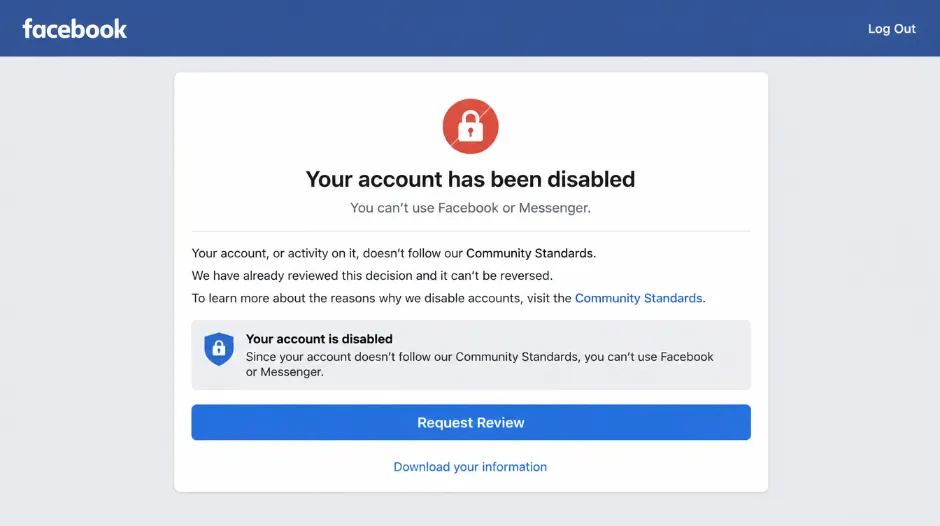
She'd woken up to find her Facebook account completely disabled. No warning. No explanation. Just a message saying her account violated Facebook's Community Standards and was permanently disabled. The problem: her entire business ran through that Facebook account. She had a page with 14,000 followers for her freelance writing services. All her client inquiries came through Facebook Messenger. Her portfolio was linked through the profile. Testimonials were in the comments. Years of content, relationships, and business infrastructure — gone.
"What did I do?" she asked me, genuinely confused. "I don't post anything controversial. I don't spam. I barely post anything anymore. How can they just delete my entire account?" She immediately tried everything — clicking "request review," sending support messages, trying to log in repeatedly. Nothing worked.
She spent three days thinking her business was over. Then she found the appeal process — the one Facebook doesn't advertise, the one most people don't know exists. Within two weeks of a proper appeal, her account was restored.
Facebook account disabling is scary but not always permanent. There's an actual appeals process. Most people don't use it correctly, which is why most appeals fail. But if you understand what actually happened and how to appeal properly, you have a real chance of getting your account back. "If I'd known there was an actual way to appeal," Sarah told me, "I wouldn't have spent those days thinking I'd lost everything."
Understanding Facebook Account Disabling
Before appealing, you need to understand what actually happened to your account — because "disabled" can mean very different things.
What "Disabled" Actually Means
✅ Temporarily Suspended
- Locked for 24 hours to 30 days
- Usually for suspicious activity
- Often fixable by changing password or verifying identity
- Account still exists — just inaccessible temporarily
⚠️ Restricted
- Can still log in but can't post, message, or access certain features
- Temporary (24 hours to 7 days typically)
- Often for lightly violating Community Standards
- Features return automatically after restriction period
🔴 Permanently Disabled
- Account completely inaccessible
- Can't log in at all
- Pages and content associated with account affected
- Shows "permanently disabled for violating Community Standards"
If you can still log in, it's not permanently disabled — it's restricted or suspended, which is much easier to fix. If you can't log in at all and get the "permanently disabled" message, the real question is: is it actually permanent, or just the default message Facebook shows? In many cases, it's the latter — and the appeals process can reverse it.
Why Facebook Disables Accounts
🚨 Legitimate Reasons (Facebook Is Right)
- Repeated harassment or threats
- Actual spam content or fake engagement
- Hacked account with unusual activity
- Child safety violations
- Authentic hate speech or violence incitement
- Sexual exploitation material
⚠️ Common False Positives (Facebook Is Often Wrong)
- "Suspicious activity" — often automated false positives
- Misidentified Community Standards violation
- Paying for ads with new payment method (triggers fraud filters)
- Using VPN or unstable internet connection
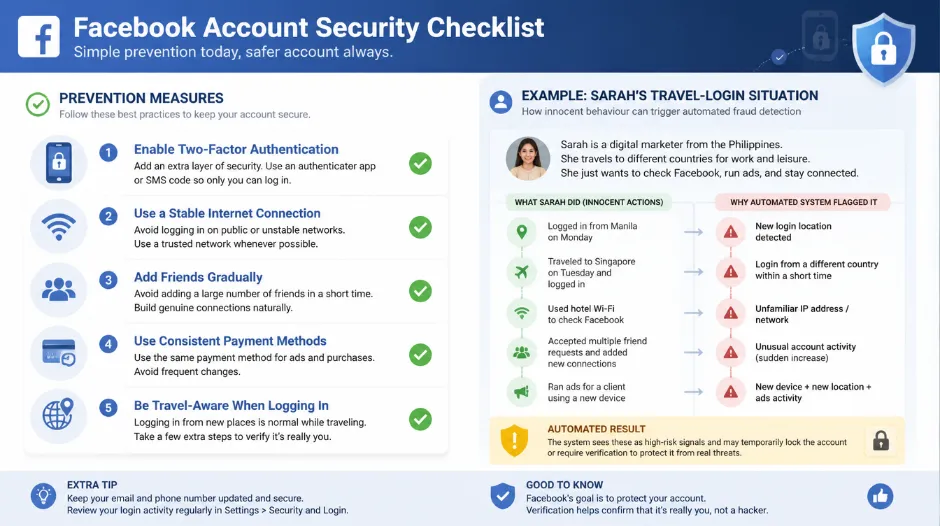
- Logging in from multiple locations when travelling
- Bulk adding friends (appears bot-like to automation)
Sarah's Actual Violation
When her account was restored, Facebook disclosed the reason: "Suspicious activity detected — multiple login attempts from different locations." What actually happened: she'd been travelling for work, logging in from different countries and different devices, changing passwords when she couldn't access the account. Facebook's fraud detection saw this as an account takeover and disabled it. Was Facebook wrong? Not entirely — they were protecting against hacking. Was the response harsh? Absolutely — instant permanent disable without warning. Was it fixable? Yes, completely — with a proper appeal explaining what had actually happened.
The Facebook Appeal Process — Your Options
Step 1: Understand Your Appeal Options
Request Review (In-App)
If you can still access the disabled account message, click the "Request Review" button and submit through Facebook's system.
Submit Formal Appeal via Email
More thorough process, better success rate. Requires finding the correct contact method and writing a professional appeal. This is what Sarah used.
Appeal Through the Help Form
Facebook's official appeal form available at facebook.com/help/contact. A structured process that sits between the two other options in thoroughness.
Step 2: Gather Your Information Before Appealing
Account information to collect: email associated with the account, phone number on the account, approximate account creation date, approximate follower count, whether it's a business or personal account.
Context about the disable: when you first noticed the disabled message, anything unusual you did recently (changed password, added new device, changed payment method, travelled, accessed from new location), any recent Facebook interaction before the disable.
Evidence of legitimacy: screenshots of your business if it's a business account, testimonials from followers, documentation of account legitimacy, history showing years of posting, friends, followers. If you don't have screenshots, write a detailed account of what your account contained and who followed it.
Step 3: Find the Right Appeal Method
In-App "Request Review" Button
Go to facebook.com and try to log in. If you see the disabled message with a "Request Review" button, click it, fill out the form, and submit. This is your fastest first attempt — results in 1–7 days.
Formal Appeal via Help Form
Go to facebook.com/help/contact, select "Report a Problem," choose "Something isn't working," select account issue, write a detailed explanation, and submit. Good if the Request Review button isn't available.
Direct Email Appeal (Most Effective)
Find Facebook's appeals email — appeals[@]fb.com or support depending on issue type. Write a formal letter with full account information, thorough explanation of the situation, and any evidence you can provide. This is what got Sarah's account restored in five days.
Try the in-app "Request Review" method first — it takes about a week. If that gets rejected, escalate immediately to the formal email appeal. Don't wait or accept the first rejection as final. Sarah's successful restoration came from the formal email appeal after the initial request review was denied.
Step 4: Writing Your Appeal — The Critical Part
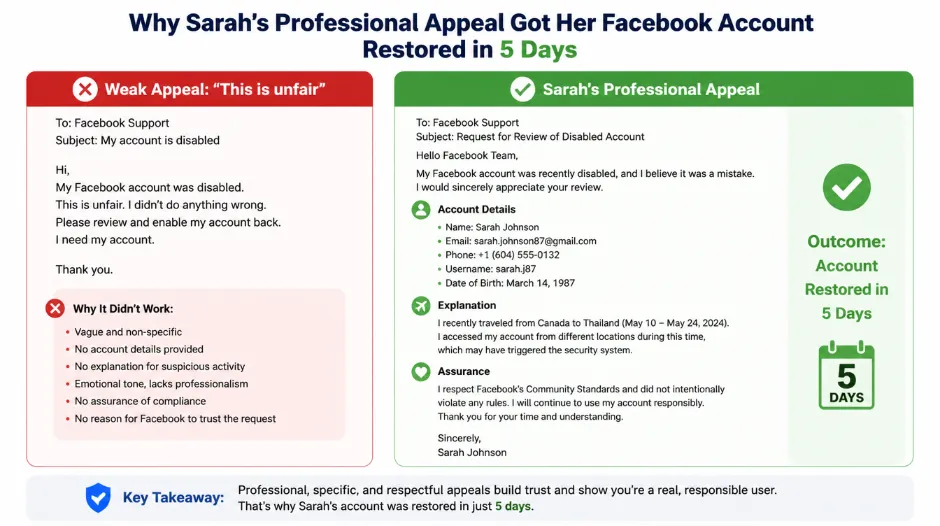
This is where most appeals fail. Facebook receives millions of appeals. Yours needs to be specific, professional, and compelling.
❌ What NOT to Write
- "This is unfair!"
- "I didn't do anything wrong"
- "Please fix this, I'm desperate"
- Angry or emotional tone
- Blaming Facebook for "censorship"
- Vague, unspecific explanations
- Speculating that you might have violated something
✅ What TO Write
- Professional, respectful tone throughout
- Specific details about your account and situation
- Acknowledgment of what might have triggered it
- Explanation clearly demonstrating legitimacy
- Offer to verify identity or take additional security measures
- Clear, concrete account history
- Cooperative, solution-oriented framing
Sarah's Winning Appeal (Paraphrased Template)
"I'm writing to appeal the disabling of my account [email address]. My account was disabled on [date] with the message that it violated Community Standards or flagged suspicious activity.
I believe this was triggered by unusual login activity. During [dates], I was travelling internationally for client work and logged in from multiple countries (specifically [locations]). I also changed my password twice during this period when I was unable to access my account, which likely triggered multiple failed login attempts in Facebook's system.
This is a legitimate business account I've maintained since [year]. I use it primarily for my [type of] business, where I communicate with clients and post [content type]. The account has [number] followers — mostly clients and professional connections built over [time period].
I have not engaged in any behaviour violating Facebook's Community Standards. I do not spam, do not engage in harassment, and do not post prohibited content.
I would appreciate the opportunity to regain access to this account. I'm happy to verify my identity further or take additional security measures if needed.
Thank you for reviewing my appeal."
It's respectful and professional. It acknowledges Facebook's concern (suspicious activity was a legitimate flag). It explains the legitimate reason behind what triggered the flag. It demonstrates account legitimacy through specific history. It shows understanding of Facebook's policies. And it offers cooperation — which signals you're a good-faith actor, not someone trying to evade accountability.
Step 5 & 6: Submit, Wait, and Respond to the Outcome
After Submitting Your Appeal
Timeline expectations: in-app request review usually takes 1–7 days. Formal email appeal takes 1–4 weeks typically. Can take up to 30 days in some cases. Some take 2–3 months for complex situations.
What to do while waiting: do not create a new account while your appeal is pending — Facebook may link accounts and disable both. Do not spam Facebook support with repeated messages — this can hurt your case. Do not post negative public reviews about Facebook. Do check your email regularly for a response. Do keep a copy of your appeal for reference. Consider escalating with additional evidence if you receive no response after 14 days.
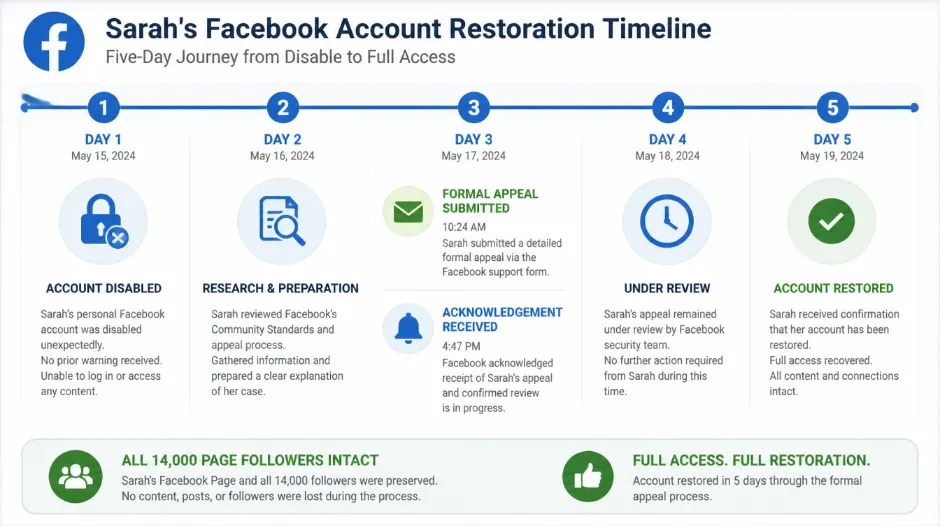
Sarah's timeline: submitted formal email appeal on Monday, received automated acknowledgement on Wednesday, account restored on Friday — five days total.
The Three Responses You'll Get
Approved — Account Restored
Email says account has been restored. Try logging in immediately. Change your password for security. Enable two-factor authentication to prevent future issues. Avoid the activity that triggered the false positive going forward.
Denied — Appeal Rejected
Email explains why (usually vague). You can appeal again with a different approach or new information. Or you can accept the decision and move forward. Facebook rarely changes a rejection on an immediate re-appeal without new information.
No Response After 30 Days
After 30 days with no response, treat it as a denial. You can appeal again through a different channel. Or try a different contact method entirely. Persistence sometimes works, but temper expectations after multiple attempts.
Common Appeal Mistakes That Kill Your Chances
These seven mistakes account for the majority of failed appeals — and almost all of them are completely avoidable.
Writing "this is unfair" or "I didn't do anything wrong" without any specifics. Facebook receives millions of appeals — yours needs to be specific, professional, and compelling to stand out.
Spamming Facebook with repeated appeals in quick succession signals desperation and can cause your case to be deprioritised or ignored entirely.
"I might have posted something controversial" or "I probably violated something" reads as confession to a system looking for reasons to maintain the disable.
Facebook links accounts to the same person. Creating a new account while your original appeal is pending can result in both accounts being disabled.
"Your system is garbage" or "This is censorship" will not help your case. The humans reviewing appeals respond much better to respectful, cooperative communication.
Sending your appeal to general Facebook support instead of the appeals team means it gets lost in the wrong queue and may never be seen by a reviewer.
Saying "I'm a legitimate business" without any proof is a weak appeal. Reviewers need something concrete to support your claim beyond your own assertion.
What Actually Happens — The Real Timeline
Here's the honest, hour-by-hour sequence of what most people experience after their account is disabled.
Account is disabled, you notice and immediately panic. You try to log in repeatedly — this doesn't help and never will.
You search online for solutions, read conflicting advice, and feel increasingly overwhelmed by the scale of the problem.
You click "Request Review" in-app if the button is available. This is worth doing but has a low success rate without a strong accompanying explanation.
You research the proper appeal process (or find this guide), realise the in-app request alone probably won't work, and begin preparing your formal appeal.
You submit your formal appeal using the template above — professional, specific, explaining the legitimate context for what triggered the disable.
You receive an automated response: "We've received your appeal, please allow time for review." This is not a decision — just acknowledgement.
You check your email regularly. Nothing arrives. This is normal — the review process takes time. Do not submit additional appeals during this window.
Account restored — you log in immediately, change your password, enable two-factor authentication, and avoid the activity that triggered the original disable.
You regroup, decide whether to attempt a second appeal with new information, or accept the decision and move forward with rebuilding elsewhere.
After 30 days with no response, treat it as an effective denial. You can try a different contact method or accept the situation and move forward.
When Restoration Is Likely vs. Unlikely
Be realistic with yourself: some accounts won't be restored, and knowing which category you fall into saves significant time and energy.
✅ Likely to Restore
- First-time violation (usually gets benefit of the doubt)
- Suspicious activity that was not actually malicious
- Misidentified Community Standards violation
- Technical error or automated false positive
- Account hacked and you can verify your identity
- Travel or multi-device activity that triggered fraud detection
❌ Unlikely to Restore
- Actual repeated harassment or threats — documented
- Genuine child safety violations
- Repeated violations after prior warnings
- Account genuinely used for spam or scams
- Multiple previous violations on the same account
- Account used for selling fake engagement services
Sarah's situation was easily restorable because it was a false positive — suspicious activity that wasn't actually malicious. If your account had genuine violations (harassing someone, spreading hateful content, running scams), restoration is much less likely. Be honest with yourself about which category you actually fall into. Appealing when the disable is justified wastes time you could spend rebuilding elsewhere.
Prevention and the GTR Socials Perspective
At GTR Socials, we work with creators protecting their social media accounts, and account disabling is one of the most alarming situations we see creators face. Our consistent finding: Facebook's automated systems have a high false positive rate, most disabled accounts can appeal successfully, and professional appeals increase success rates dramatically.
How to Prevent Account Disabling
- Use a stable internet connection without a VPN unless necessary
- Don't bulk-add friends or followers in rapid succession — it appears bot-like to Facebook's automation
- Avoid unusual payment methods when running ads, especially new ones added for the first time
- Enable two-factor authentication — it significantly reduces hacking risk and fraud flags
- Keep your password secure and change it deliberately, not reactively
- If you travel frequently for work, be aware that multi-country logins can trigger fraud detection
- Don't log in from many different locations in rapid succession without using a consistent device
If It Happens: The Right Response Order
- Stay calm — many disabled accounts are reversible with the right approach
- Don't panic-create a new account — this can get both disabled
- Submit a proper, professional appeal following the template in this guide
- Be specific and include evidence of legitimate use
- Wait for the full review process without spamming additional appeals
- Escalate if needed after the initial review period with new information
Facebook disabling is harsh but often reversible if you appeal properly. Most people give up after one rejection or weak attempt — which is why most appeals fail. The accounts that get restored are the ones where the creator submits a professional, specific, evidence-backed appeal and follows through if the first attempt is rejected. Persistence with quality matters far more than volume of attempts.
FAQ: Disabled Facebook Accounts
Your Account Appeal Action Plan
Stop Panicking, Start Documenting
Goal: preserve information and avoid panic decisions.
- Take a screenshot of the disabled message
- Write down all account details you remember (email, creation date, followers)
- Gather any existing screenshots or documentation of your account
- Don't panic-create a new account
Submit In-App Request Review
Goal: initiate the fastest available process while you prepare the formal appeal.
- If the "Request Review" button is visible, click it
- Fill out the form as thoroughly as possible
- Submit and note the date
- Begin preparing your formal appeal in parallel
Write and Submit Professional Formal Appeal
Goal: give Facebook the detailed, professional case it needs to restore your account.
- Write your appeal using the template from this guide
- Include all relevant account information and context
- Attach or reference any evidence of legitimate use
- Submit via appeals[@]fb.com or the help centre appeals form
Monitor Without Panicking
Goal: give the process time to work without undermining it.
- Check your email daily for a response
- Do not submit additional appeals — wait for the full period
- Do not create a new account
- Do not post negative public content about Facebook
Act on the Outcome
Goal: secure your account if restored, or make peace with moving forward if not.
- If approved: change password immediately, enable two-factor authentication, avoid the activity that triggered the disable
- If denied: consider reappeal with new information, or accept and rebuild presence elsewhere
- If no response after 30 days: treat as denial and plan your next step
"The scariest part wasn't the disabling. It was not knowing if I could get it back. Once I understood there was an actual process and submitted a real appeal, I felt in control again." You have control here. Facebook's automated system disabled your account — but Facebook's human review process can restore it, if you appeal properly. Stop panicking. Start appealing the right way. Your account might be fully recoverable. You won't know unless you try.
🔒 Protect Your Facebook Presence While You Still Can
GTR Socials helps creators build genuine Facebook engagement — real followers, likes, and page growth that builds the social proof and account history that supports successful appeals if you ever need one.
Comments (0)